This article guides you through turning business needs into sprint-ready tasks, making it easy to understand. You will understand what sprint planning product engineering actually means, why a PRD still matters even in agile teams, and how both work together to ensure clarity, alignment, and smooth delivery. By the end, you get a free PRD template you can use right away.
Table of Contents
Introduction
If you’ve ever been part of a product engineering cycle, you probably know how it goes. The business team walks in with a list of requirements, sometimes clear, sometimes unclear. Everyone nods, the meeting ends, and then suddenly you’re staring at Jira or Trello, wondering, “Okay, but what do we actually build first?”
This gap between what the business wants and what developers can start building is where most teams lose time, clarity, and momentum.
In this blog, we will discuss how to turn a business requirement (even a messy one) into clean, sprint-ready tasks your team can pick up without confusion. We’ll also give you a Free PRD template to make things easier.
What Does Sprint Planning Really Mean in Product Engineering?
Let’s clear this up early, because many teams misunderstand it. Sprint planning is the meeting that marks the official start of a sprint. It’s when the team looks at the product backlog and asks: “What can we realistically commit to for the next one or two weeks?”
A solid sprint planning session produces only two things:
- A Sprint Goal: One sentence describing what the sprint aims to achieve.
- A Sprint Backlog: A refined list of prioritized user stories and small, clear tasks.
Sprint planning exists to keep everyone aligned, product owners, developers, designers, and QA, all focused on the same outcome. In product engineering, especially with SaaS or complex builds, it’s the key moment when business intention becomes technical execution.
Why Business Requirements Don’t Automatically Become Sprint Tasks?
Business requirements often arrive in big-picture format. For example, you have often come across such requests or commands from your team lead, manager, or project coordinators:
- We need a better onboarding flow.
- Make the checkout process faster.
- Users should be able to reset their password.
It is useful to make direct demands. But it is not enough to be actionable. And in case you end up dumping this into sprints, you will get:
- Misaligned expectations
- Oversized tasks
- Missing acceptance criteria
- Confusion between business and engineering
- Developers “guessing” the intent
- QA testing without clarity
- And plenty of rework later
That’s why you need something in the middle: a single source translator, A PRD.
What a PRD Is And Why Teams Still Need One?
Despite what some people think, agility doesn’t eliminate documentation. It just makes documentation cleaner and more practical. A PRD, known as Product Requirements Document, does exactly what the name suggests.
It explains what needs to be built, why it matters, and what the outcome should look like.
A Good PRD includes:
- Problem statement
- Business goals
- Who the feature is for
- Functional & non-functional requirements
- Basic user flows
- Acceptance criteria
- Dependencies, risks, constraints
You don’t need a 40-page artifact. Just enough clarity so everyone is working with the same understanding. This simple document avoids misunderstandings, reduces scope creep, and keeps product, design, dev, and QA aligned from day one.
Where Does Sprint Planning and PRD Work Together?
You begin by identifying the business’s needs, organizing them, and documenting them in the PRD. But wait! The PRD isn’t the final step. The following move is to divide it up:
PRD → Epic → User Stories → Sprint Task
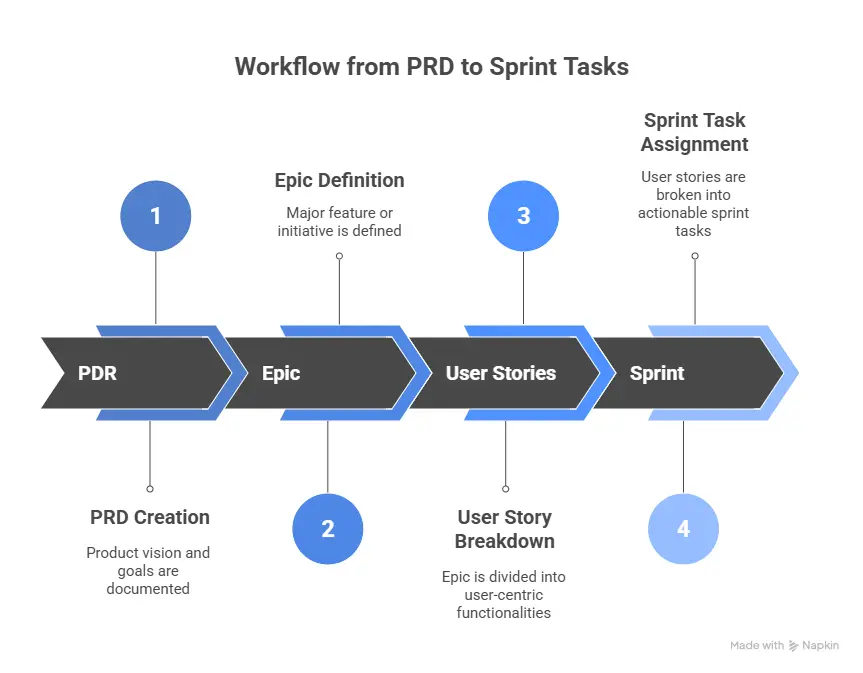
This is the point where a large idea turns into something you can actually do.
When done right:
- Business goals stay the same
- Developers understand what to do
- Designers know where they fit
- QA knows exactly what to test
- Sprints stay realistic and clean
This combination of a structured PRD and disciplined sprint planning ensures you’re building what matters without drifting off track.
Step-by-Step: Turning a Business Requirement Into Sprint Tasks
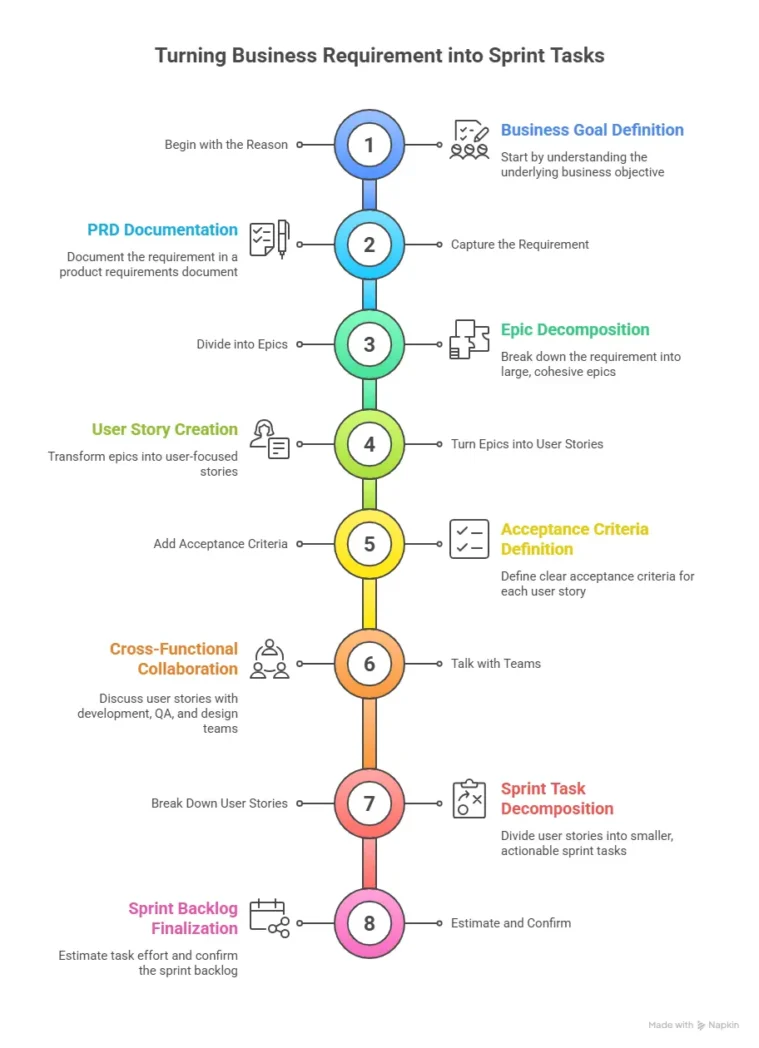
Let’s keep this straightforward, like we are in a meeting room chatting about this while having tea.
Step 1: Begin with the Reason (Business Goal)
First, figure out what the company needs and why. This might seem basic, but it can clear up a lot of issues.
Consider asking questions such as:
- What is the reason for this feature?
- Is it resolving an issue or enhancing something?
- What would occur if we don’t create it?
- Who will gain from this?
These answers shape the PRD and guide later decisions.
Step 2: Capture the Requirement in the PRD
Now take that clarity and put it into a PRD:
- Issue
- Goal
- Target user
- functional requirements
- Expected flow
- Acceptable terms
- Dependencies
There is no need to polish it. It just has to be readable and realistic.
Step 3: Divide the Claim into Epics
Consider epics as big sections of work. For instance, enhancements to how users get started might include.
- Signup flow
- Email verification
- Profile completion
- Welcome screen
This is where your feature stops feeling overwhelming.
Step 4: Turn Epics Into User Stories
A user story keeps things human. It’s always from the user’s point of view.
For example: As a user, I want to verify my email so that I can securely access my account. You must keep the story small to deliver within the sprint. Keep stories small enough to deliver within a sprint.
Step 5: Add Acceptance Criteria
This is the part teams often skip, and then later suffer. Acceptance criteria give developers a finish line, whereas QA gets test points. At the same time, designers know what experience to shape.
For example:
- User receives OTP within 10 seconds
- OTP expires in 5 minutes
- An error is shown if the OTP is wrong
It’s a straightforward method that doesn’t leave anything to guess.
Step 6: Talk With Development, QA & Design Teams
Before planning the sprint, collect information like:
- Can we actually do this from a technical standpoint?
- Do we require any new APIs?
- Do we need to change anything in the user interface?
- How long will this take to complete?
- What might prevent this from being done?
This helps avoid weeks of confusion and needing to go back and fix things.
Step 7: Break Down User Stories into Sprint Tasks
These are specific activities that developers will work on. For example, let’s say we need to create a more secure and convenient way for users to reset their passwords.
Sprint tasks may include:
- User interface design for resetting passwords
- Create an API endpoint to send one-time passwords
- Define how token verification works
- Connect the user interface to the backend system
- Writing tests for the code
- Conducting quality assurance (QA) tests for unusual situations
Step 8: Estimate and Confirm Sprint Backlog
Finally, estimate each task. Use story points or hours, whatever your team prefers. Then pick only what fits into your sprint capacity.
Good sprint planning product engineering doesn’t overload the team. It gives everyone a fair shot at completing the sprint successfully.
Mistakes Teams Make When Converting Requirements into Tasks
You’ll relate to these:
- Tasks with no acceptance criteria
- Huge tasks that belong in two sprints
- Stories without design clarity
- Business adding “one more small thing” during the sprint
- Developers assuming what wasn’t written
- UX is coming in too late
- QA is getting requirements after development
If you avoid these, your sprint will already be miles smoother.
Wrapping it Up
Translating business requirements into sprint-ready tasks doesn’t have to be challenging. When you understand PRD from epics to stories and the flow of tasks, your entire product cycle becomes clearer, intuitive, and far more predictable. It’s a simple structure, but it brings discipline, alignment, and consistency to every product creation, no matter how complex.
If you want to bring this level of clarity into your own project, connect with Team Metizsoft. We’ve created a clean, ready-to-use PRD template designed exactly for teams like yours. Download the PRD Template and use it in your upcoming projects!
FAQs
Do small features also need a PRD?
If it affects users or logic, yes. Keep it short, but document it.
How big should a sprint task be?
Small enough for one person to finish within a day or two.
Who writes user stories?
Usually, the product owner, but refined with dev/QA/design support.
What causes sprint delays most often?
Unclear requirements and oversized stories, not the coding itself.
Should sprint planning include design work?
No. Design should be done before the sprint so devs can start smoothly.